Table of Contents
Why SAP BASIS Teams Need to Embrace Automation Now
Let me be honest with something. If you’re still provisioning SAP systems manually in 2026, you’re not just working harder than you need to — you’re actively falling behind. I’ve seen Basis teams spend entire weekends running SWPM installations that could’ve kicked off Friday evening and finished before Monday’s standup. The thing is, SAP infrastructure doesn’t care if you’re tired. It doesn’t care if it’s 2 AM. It just needs to be done right.
That’s where automation comes in — and specifically, the combination of Terraform for infrastructure provisioning and Ansible for configuration management. Together, they turn SAP operations from a series of manual checklists into repeatable, version-controlled, auditable code. Think of it like this: instead of being the person who carries bricks every day, you become the person who designs the brick factory.
In this guide, I’ll walk you through how to use SAP BASIS automation tools like Terraform and Ansible together for SAP infrastructure — from provisioning cloud resources to installing HANA, configuring SUSE OS, automating SWPM, and even setting up CI/CD pipelines for your SAP landscape. This isn’t theoretical. These are patterns being used by forward-thinking Basis teams right now.
Terraform — Your Infrastructure Foundation
Terraform is an Infrastructure-as-Code (IaC) tool from HashiCorp that lets you define cloud resources in declarative configuration files. Instead of clicking through the AWS or Azure console to provision a VM, you write code that describes exactly what you want — instance type, disk size, network configuration, security groups — and Terraform makes it happen.
Why Terraform for SAP?
Here’s what makes Terraform one of the most valuable SAP BASIS automation tools available today:
- Reproducibility: Need to create a clone of your production landscape for testing? Run the same Terraform config with a different variable file. Same result, every time.
- Multi-cloud support: Whether you’re on AWS, Azure, or GCP, Terraform providers handle the cloud-specific details. You write HCL, it translates to cloud API calls.
- State management: Terraform tracks what it’s provisioned. It knows if someone manually changed a security group and can reconcile drift.
- Version control: Your infrastructure definition lives in Git. You can diff changes, review pull requests, and roll back if something breaks.
Provisioning SAP Infrastructure on AWS — A Practical Example
Let’s say you need to provision an SAP HANA instance on AWS. You’d need an EC2 instance (M-series for HANA), proper EBS volumes for data and log, security groups for access control, and maybe an S3 bucket for installation media. Here’s what that looks like in Terraform:
# main.tf — SAP HANA on AWS
resource "aws_instance" "hana" {
  ami           = "ami-0abcdef1234567890"  # SUSE SLES for SAP 15 SP5
  instance_type = "m5.4xlarge"              # 16 vCPU, 64 GB RAM

  root_block_device {
    volume_size = 100
    volume_type = "gp3"
  }

  tags = {
    Name        = "sap-hana-prod"
    Environment = "production"
    ManagedBy   = "terraform"
  }
}

resource "aws_ebs_volume" "hana_data" {
  availability_zone = aws_instance.hana.availability_zone
  size              = 512
  type              = "io2"
  iops              = 3000

  tags = {
    Name = "hana-data-volume"
  }
}

resource "aws_ebs_volume" "hana_log" {
  availability_zone = aws_instance.hana.availability_zone
  size              = 256
  type              = "io2"
  iops              = 5000

  tags = {
    Name = "hana-log-volume"
  }
}
Now, here’s where it gets interesting. You can parameterize this with Terraform variables so the same config works for dev (smaller instance), test (medium), and production (full size). One codebase, three environments.
Ansible — Configuration Management for SAP Operations
Ansible is another essential piece of the SAP BASIS automation tools puzzle. While Terraform provisions the infrastructure, Ansible configures what runs on it.
SUSE sles_sap_automation Pattern
If you’re running SAP on SUSE (and let’s be real, most HANA shops are), SUSE provides an official automation pattern called sles_sap_automation. This isn’t some community hack — it’s SUSE-supported and installs four key Ansible collections:
- ansible-sap-install: Automates SAP software installation
- ansible-sap-infrastructure: OS configuration for SAP workloads
- ansible-sap-operations: Day-2 operations like patching, system copies
- ansible-sap-playbooks: End-to-end deployment playbooks
To install it on SUSE Linux Enterprise Server for SAP Applications 16:
# Install the automation pattern
sudo zypper install -y patterns-sles_sap_automation

# This installs:
# - ansible-sap-install
# - ansible-sap-infrastructure
# - ansible-sap-operations
# - ansible-sap-playbooks
Automating SAP HANA Installation with Ansible
The most powerful use case I’ve seen is automating HANA installation via hdblcm response files. Instead of manually filling in 50+ parameters during installation, you define them once in an Ansible playbook and let it run:
# ansible-hana-install.yml
---
- name: Install SAP HANA Database
  hosts: hana_servers
  become: yes
  vars:
    hana_sid: HDB
    hana_instance: "00"
    hana_password: "{{ vault_hana_password }}"
    hana_media: /sapmnt/media/hana

  tasks:
    - name: Copy HANA installation media
      copy:
        src: "{{ hana_media }}/"
        dest: /tmp/hana_install/

    - name: Generate hdblcm response file
      template:
        src: hdblcm_response.j2
        dest: /tmp/hana_install/hdblcm_response.ini

    - name: Run hdblcm for unattended installation
      command: |
        ./hdblcm --batch --configfile=/tmp/hana_install/hdblcm_response.ini
      args:
        chdir: /tmp/hana_install/SAP_HANA_DATABASE/
      register: hana_install_result

    - name: Verify HANA installation
      command: "sapcontrol -nr {{ hana_instance }} -function GetProcessList"
      register: hana_status
      failed_when: "'Running' not in hana_status.stdout"
The response file template (hdblcm_response.j2) uses Jinja2 to inject variables — SID, instance number, passwords, data/log paths — making the entire installation parameterized and repeatable.
Combining Terraform and Ansible — The Full Pipeline
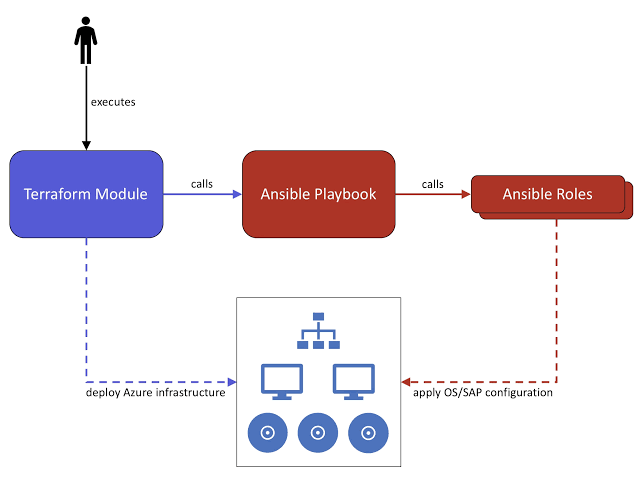
Here’s where the magic happens. SAP BASIS automation tools like Terraform and Ansible work together in a complementary way — Terraform provisions the infrastructure, then hands off to Ansible for configuration.
- Terraform provisions cloud resources (VMs, disks, networking)
- Terraform outputs IP addresses and hostnames
- Ansible dynamic inventory reads Terraform state
- Ansible playbooks configure OS, install SAP software, verify
- Post-provisioning — monitoring agents, backup config, security hardening
You can orchestrate this entire flow with a simple shell script or integrate it into a CI/CD pipeline. Speaking of which…
CI/CD Pipeline for SAP Infrastructure
This might sound controversial, but yes — SAP infrastructure can and should go through CI/CD. I’ve seen teams use GitLab CI or GitHub Actions to manage their entire SAP provisioning workflow:
# .gitlab-ci.yml — SAP Infrastructure Pipeline
stages:
  - validate
  - plan
  - provision
  - configure
  - verify

validate:
  stage: validate
  script:
    - terraform validate
    - ansible-lint ansible/*.yml

plan:
  stage: plan
  script:
    - terraform plan -out=tfplan
  artifacts:
    paths:
      - tfplan

provision:
  stage: provision
  script:
    - terraform apply -auto-approve tfplan
  when: manual  # Manual gate for production

configure:
  stage: configure
  script:
    - ansible-playbook -i inventory/hosts ansible/site.yml --extra-vars "env={{ deploy_env }}"

verify:
  stage: verify
  script:
    - ansible-playbook ansible/verify-deployment.yml
Notice the manual gate on production provisioning. You’re not going to accidentally spin up a production HANA instance because someone pushed to main. But for dev and test? Fully automated. Push code, get a fully configured SAP system 30 minutes later.
Day-2 Operations Automation
Provisioning is just the beginning. Where automation really pays off is in ongoing operations:
- System copies and refreshes: Ansible can automate the entire post-copy process — BDLS, RFC updates, job cleanup, buffer resets. What used to take a full day now runs in 2 hours unattended.
- Patching and updates: Kernel updates, support packages, HANA revisions. Define the patch window in your playbook, run it across all systems sequentially with health checks between each.
- Backup configuration: Set up HANA backup schedules, configure Backint integration, verify backup catalog health — all through Ansible tasks.
- Monitoring setup: Deploy and configure SAP Cloud ALM agents, set up custom alerts, configure log forwarding.
Real-World External Resources
If you’re looking to go deeper on specific areas, here are some excellent resources from the SAP community and SUSE documentation. I’ve also covered related topics on this blog — check out my guides on Terraform for SAP BTP, Architecting SAP on AWS, and SAP Cloud ALM for more hands-on walkthroughs.
- Deploying SAP HANA 2.0 on AWS Using Terraform and Ansible — A practical walkthrough from the SAP Community showing the full Terraform-to-Ansible handoff for HANA deployment on AWS.
- Ansible Automation for SUSE Linux Enterprise Server for SAP Applications 16 — Official SUSE documentation covering the sles_sap_automation pattern and the four Ansible collections it provides.
- sap-linuxlab/ansible.playbooks_for_sap — Open-source Ansible playbooks for deploying SAP software across AWS, Azure, GCP, and VMware. Supports everything from sandbox S/4HANA to distributed HA configurations.
Getting Started — A Practical Roadmap
I know this can feel overwhelming. You don’t have to automate everything at once. Here’s a pragmatic approach:
- Start with OS configuration. Write an Ansible playbook that configures SUSE for SAP — kernel parameters, resource limits, packages, users. Run it on one test system.
- Add HANA installation. Use the hdblcm response file approach. Get it working on a single VM.
- Introduce Terraform. Move your VM provisioning into Terraform. Start with a simple config, iterate.
- Connect them. Use Terraform outputs to feed Ansible’s inventory. Run the full pipeline end-to-end.
- Expand to day-2 ops. Add backup configuration, patching, monitoring setup.
- Add CI/CD. Put it in Git, add a pipeline, add approval gates.
Each step builds on the previous one. By step 6, you’ve got a fully automated SAP infrastructure pipeline that your team can run with a single command.
Conclusion — The Future of BASIS is Code
Here’s what I believe: the Basis administrators who thrive in the next five years won’t be the ones who can run SWPM the fastest. They’ll be the ones who never have to run SWPM manually at all. Automation isn’t replacing Basis professionals — it’s elevating them from operators to engineers.
SAP landscapes are only getting more complex. RISE with SAP, hybrid cloud, multi-cloud deployments, continuous innovation — none of this scales without automation. Terraform and Ansible give you the tools to meet that complexity head-on.
Start small. Pick one manual process that frustrates your team and automate it this month. Then do it again next month. Before you know it, you’ll wonder how you ever managed SAP without code.
Have you started automating SAP operations? I’d love to hear what’s working for your team — or what’s holding you back. Drop a comment below or reach out to connect.