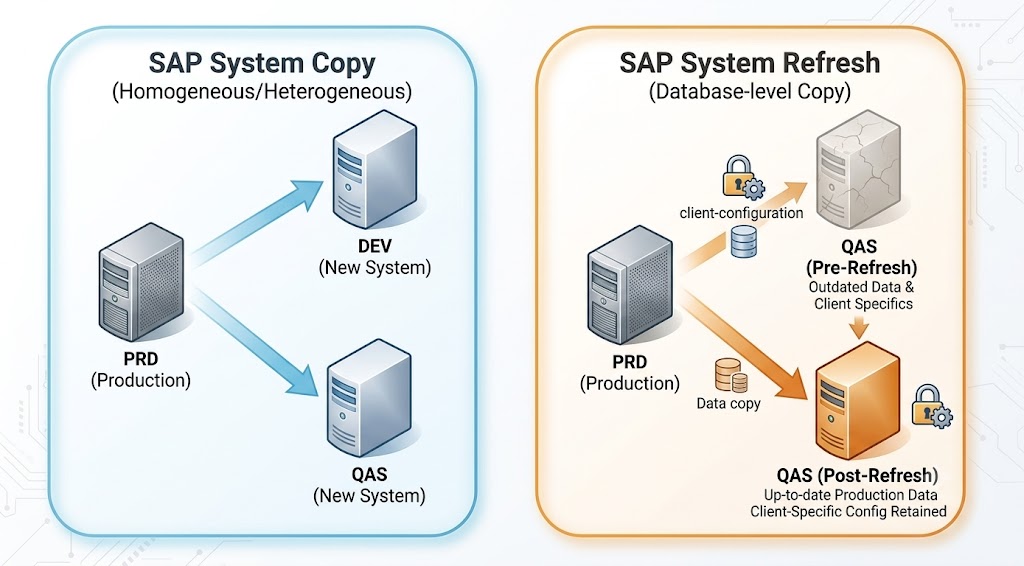
If you’ve been in SAP Basis long enough, you know the feeling. Production crashed over the weekend, and management wants a fresh system copy “yesterday.” System copy refresh sounds simple on paper — copy system A to B, change the SID. But anyone who’s actually done it knows the reality: RFC destinations pointing back to production, logical system names carrying the old SID, stalled update requests. I’ve seen it all.
This guide walks through the entire homogeneous system copy process for S/4HANA — from preparation to post-copy cleanup — the way a seasoned Basis admin actually does it.
Table of Contents
What Is a Homogeneous System Copy?
A homogeneous SAP system copy means the source and target run on the same operating system and database platform. For S/4HANA, that’s typically Linux on x86_64 with HANA. You export the source database and import into the target with a new SID. The alternative — heterogeneous copy — involves a platform change like moving from Oracle to HANA. For most Basis teams, homogeneous is the bread and butter: refreshing QA from production, spinning up sandboxes, or cloning dev systems.
If you’re in the middle of an ECC to S/4HANA conversion, system copy becomes even more critical — you’ll need solid copies for dress rehearsals and parallel testing before cutover.
Preparation — Before You Touch Anything
This is where most mistakes happen. Rushing into a system copy without proper prep guarantees pain later.
Source System Tasks
- Run DBACOCKPIT — Check HANA consistency; run full backup
- Disable background jobs (SM37) that could interfere with export
- SM02 — Lock logon; release running jobs
- Document: profile parameters, RFC destinations, printer configs (SPAD), license keys (SLICENSE). Every RFC pointing out of the source will need fixing later
Target System Tasks
- OS prep — Same Linux distro, kernel params, filesystem layout as source
- SWPM — Create target shell (instance + SCS + HANA database)
- HANA revision parity — Target must match source release train
- Transport directory — Share
/usr/sap/transacross landscape - Disk space — 1.5x source HANA data volume for export files
The Copy Procedure — SWPM Step by Step
Software Provisioning Manager (SWPM) is the tool for homogeneous system copies. Navigate to System Copy → Target System → Homogeneous System Copy.
Phase 1: Export from Source
- Run SWPM on the source with the export option
- Select HANA database export — SWPM uses hdbexport and hdbsql under the hood
- Specify the export directory — NFS share or local volume the target can also reach
- SWPM exports the HANA database to files. For a 2TB system, expect 4-8 hours
Pro tip: Run hdbsql "SELECT COUNT(*) FROM M_TABLES" before and after export to confirm record counts match. I’ve caught two silent export failures this way.
Phase 2: Import into Target
- Run SWPM on the target with the import option
- Select System Copy → Target System → Homogeneous System Copy → Import
- Point it to the same export directory
- Enter the new SAPSID — SWPM handles SID changes for database schemas automatically
- The import creates the HANA tenant, imports schema objects, and applies data files
- After import, SWPM runs SAP_BASIS_COPY_REFRESH — the automation task list for critical post-copy adjustments
If you’ve already set up a parallel landscape for S/4HANA, this is where that investment pays off. Pre-configured target systems with dedicated network and storage mean the import phase runs without surprises.
Critical Post-Copy Steps — What SWPM Doesn’t Fix
SWPM handles database and SID-level changes, but application-level cleanup depends on your environment. Here are the three most critical areas.
1. BDLS — The Most Common Oversight
BDLS (Business Data Logical System) updates logical system names carried from the source. Without this, ALE/IDoc breaks, RFC trust fails, workflow routing stops. Run BDLS immediately after SWPM. Use transaction BDLS with the old → new mapping, then confirm in BD87. Never skip this step.
2. RFC Destinations — Silent Failures Everywhere
This is the biggest source of post-copy pain. Every RFC that pointed to or from the source now has the wrong SID or hostname. Use SM59 to update them, recreate trusts via SMT1. Common blind spot: RFCs to PI/PO, Solution Manager, or GRC don’t surface in a standard SM59 search. Run SE11 → Table RFCDES → Contents to catch every RFC in the system.
3. User Passwords & Buffer Cleanup
When you refresh QA from production, every user password comes along. After the copy: mass-reset passwords via SU10, clear ABAP buffers by running $SYNC, flush the RFC cache (SM59 → Extras → Delete Cache), and run ALTER SYSTEM CLEAR SQL PLAN CACHE for HANA-specific cleanup. If your HANA system is sized correctly, the SAP HANA DBA Calculations Guide has buffer sizing recommendations that help prevent performance regressions after a copy.
Automation with SAP LaMa
For 10+ systems, manual copies don’t scale. SAP Landscape Management (LaMa) automates provisioning, cloning, refresh, and rename. The tradeoff is setup complexity — LaMa needs its own infrastructure with an SCS instance, connectors to every managed system, and an HANA database for its repository. For smaller shops with 3-5 systems, manual SWPM is perfectly adequate.
Common Mistakes
| Mistake | Impact | Fix |
|---|---|---|
| RFCs pointing to production | Data corruption from cross-system updates | SM59 audit immediately after copy |
| Missing BDLS execution | ALE/IDoc failure, workflow broken | BDLS = step 1 in post-copy checklist |
| Stale table buffers | Users see old data, wrong valuations | Restart or run $SYNC |
| Forgotten printer configs | Printout failures across landscape | Backup SPAD before copy, restore after |
| Job scheduling conflicts | Duplicate production jobs in QA | Disable all, review before reactivating |
| License key expired | System locks in 2 weeks | Install permanent license before copy |
Verification Checklist
- BDLS — Verify all logical system names updated
- SM59 — Test all critical RFC destinations
- BD87 — Confirm test IDoc reaches partner system
- SU10 — Mass-reset all user passwords
- SM37 — Delete production-specific background jobs
- SPAD — Check output devices against pre-copy backup
- STMS — Verify transport routes for the new SID
- SLICENSE — Confirm active permanent license installed
- Restart — Final restart to clear all buffers
Conclusion
SAP system copy for S/4HANA isn’t complicated — it’s unforgiving of shortcuts. The export and import is the easy part. It’s the post-copy work — BDLS, RFCs, buffers, passwords — that separates a smooth refresh from a three-day firefight. Build a repeatable checklist, customize it for your landscape, and never skip the BDLS step. What’s your system refresh horror story? Drop a comment below.